
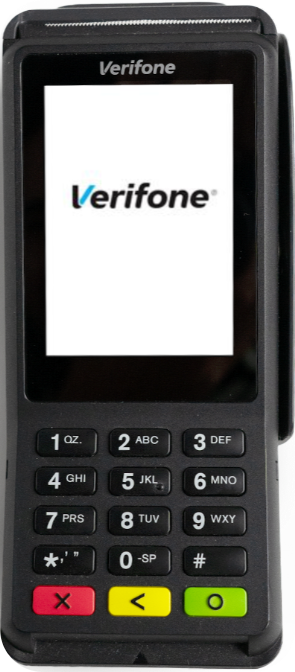
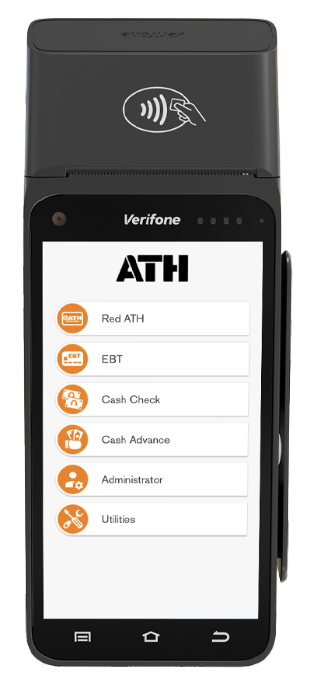

Terminal Information
Select terminal type:
-
1 – Trinity
ATH Icon > SETTINGS > Swipe to bottom → Terminal ID
-
2 – Engage
YELLOW key > Key 8 → Terminal ID

Sales
Select sale type:
-
1 – Regular Sale
-
Trinity
ATH Icon > PAYMENTS > SALE > Enter amount > CHARGE (orange)
-
Engage
ATH Network or key 1 > SALE or key 1 > Amount > ENTER (green)
-
-
2 – Manual Sale
-
Trinity
ATH Icon > SALE > Enter amount > CHARGE > Menu ☰ > MANUAL CARD ENTRY > Card + expiration
-
Engage
ATH Network > SALE > Amount > ENTER > Card + expiration > ENTER
-

ATH Móvil
Select transaction type:
-
1 – Sale (QR)
-
Trinity
ATH Icon > PAYMENTS > SALE > Amount > CHARGE > ATH MÓVIL > QR Code
-
Engage
ATH Network > ATH MÓVIL (key 4) > SALE > Amount > ENTER > QR Code
-
-
2 – Refund
-
Trinity
FUNCTIONS > REFUND > Password > CARD > Amount > REFUND (orange) ATH MÓVIL > Transaction number
-
Engage
REFUND (key 2) > Password > Amount > Key 1 > Transaction number
-

EBT
Select option:
-
1 – Sale
-
Trinity
ATH Icon > EBT > FOOD STAMPS > Amount > CHARGE
-
Engage
EBT > FOODSTAMP SALE > Amount > ENTER > Swipe > PIN
-
-
2 – Refund
-
Trinity
FUNCTIONS > REFUND > Passcode > EBT method > Amount > REFUND
-
Engage
FOODSTAMP Refund/Void > Password > Amount > Swipe card
-
-
3 – Balance Inquiry
-
Trinity
PAYMENTS > EBT > Balance Inquiry > Swipe > PIN
-
Engage
EBT (key 2) > BALANCE INQUIRY (key 4) > Swipe > PIN
-

Reports
Select action:
-
1 – Reprint Receipt
-
Trinity
FUNCTIONS > REPRINT RECEIPT > Merchant or Customer > REPRINT
-
Engage
ADMINISTRATOR (key 5) > Password > REPRINTS (key 2) LAST RECEIPT (key 1) or ANY RECEIPT (requires invoice)
-
-
2 – Reprint Deposit Report
-
Trinity
FUNCTIONS > REPORTS > Password > Select report > PRINT
-
Engage
ADMINISTRATOR (key 5) > Password > REPORTS (key 5) DISPLAY REPORTS (key 1) > SUMMARY (key 1) or DETAILED (key 2)
-
-
3 – Deposit / Settlement
-
Trinity
FUNCTIONS > SETTLEMENT > PASSWORD > SETTLE ALL
-
Engage
ADMINISTRATOR (Key 5) > Administrative PASSWORD > Settlement (Key 3)
-

Refund / Voids
Select transaction type:
-
1 – Refund Regular Sale
-
Trinity
FUNCTIONS > REFUND > Password > Amount > REFUND
-
Engage
ATH NETWORK > Refund > Password > Amount > REFUND
-
-
2 – Manual Refund
-
Trinity
Same as above, but use MANUAL CARD ENTRY option
-
Engage
REFUND > Password > Amount > Card + expiration > ENTER
-
-
3 – ATH Móvil Refund
-
Trinity
FUNCTIONS > REFUND > Password > CARD > Amount > REFUND (orange) ATH MÓVIL > Transaction number
-
Engage
REFUND (key 2) > Password > Amount > Key 1 > Transaction number
-
-
4 – VOID
-
Trinity
FUNCTIONS > VOID > Password > Select transaction > VOID (orange)
NOTE: Settlement must not have been done and it must be a credit card transaction. If the deposit was completed, use the Refund option instead of VOID.
-
Engage
ADMINISTRATOR > Password > VOID (key 1) > Invoice Number > ENTER
NOTE: Settlement must not have been done and it must be a credit card transaction. If the deposit was completed, use the Refund option instead of VOID.
-

Taxes
Select terminal:
-
1 – Trinity
SETTINGS > ASK IVU > ON (manual) / OFF (included)
-
2 – Engage
YELLOW key > Functions > Key 7 - ON (manual) / OFF (automatic)

System Error 101
SELECT MENU (bottom left) > CLEAR ALL > return to POS application to transact again

Settlement
Select terminal:
-
1 – Trinity
FUNCTIONS > SETTLEMENT > SETTLE ALL
-
2 – Engage
ADMINISTRATOR (Key 5) > Administrative PASSWORD > Settlement (Key 3)

General Information
- ☎ Technical Support: (787) 751-1401 (Sun-Sat, 24 hours)
- 📞 BPPR Merchant: (787) 773-5150 (Mon-Fri, 8am–5pm)
- 📞 FFSB Merchant: (787) 773-5484 (Mon-Fri, 8am–5pm)
-
📞 Oriental Bank:
(787) 620-7963
(787) 771-6800 ext. 3104 (Mon-Fri, 8am–5pm)